
AI assistants such as ChatGPT, Claude and Google Gemini have helped people write emails, answer questions and analyse documents for years. A newer type of tool goes a step further. It tries to finish tasks for you.
These tools are called AI agents. Instead of only answering a question, an agent can research, use software, make choices and work toward a goal with limited human input.
Picture asking for help with a business trip. A chatbot might suggest flights and hotels. An agent could search flights, compare hotels, check your calendar and ask for approval before it pays.
OpenAI, Google, Anthropic and Microsoft are all investing in this technology. Uses range from customer service to software development and financial research.
The technology is still young. Agents can make mistakes, misread instructions and create security risks when they can reach sensitive data. This article looks at what an AI agent is, how it works and where its limits are.
AI Agents: Key Facts at a Glance
The sources used here explain how agents work. They do not measure how many companies use them. So the figures below count the parts, steps and categories the sources describe, not market share.
| Fact | Detail |
|---|---|
| Core idea | Software that pursues a goal, makes decisions and uses tools |
| Main parts | An AI model, tools, and instructions with safeguards |
| Typical cycle | Plan, act, observe the result, adjust |
| Common agent types | Four: simple task, workflow, autonomous and multi-agent |
| Main risks | Errors, prompt injection, data privacy, unintended actions and cost |
What Is an AI Agent?
An AI agent is a software system that uses artificial intelligence to pursue a goal, make decisions and carry out tasks with some independence. Unlike a basic chatbot, it can work with outside tools and apps to finish a series of actions.
The user sets the objective. The agent decides how to reach it within the permissions it has been given.
Take a competitor review. A chatbot can explain how to do one. An agent could find the competitors, collect details from their websites, compare products, fill in a spreadsheet and write a summary.
OpenAI’s guide to building agents points to three defining features. An AI model controls how the workflow runs. The agent has tools to reach outside services, and it follows instructions and safeguards that set out what it can and cannot do.
This sets real agents apart from ordinary software that only adds AI-written text to a page.
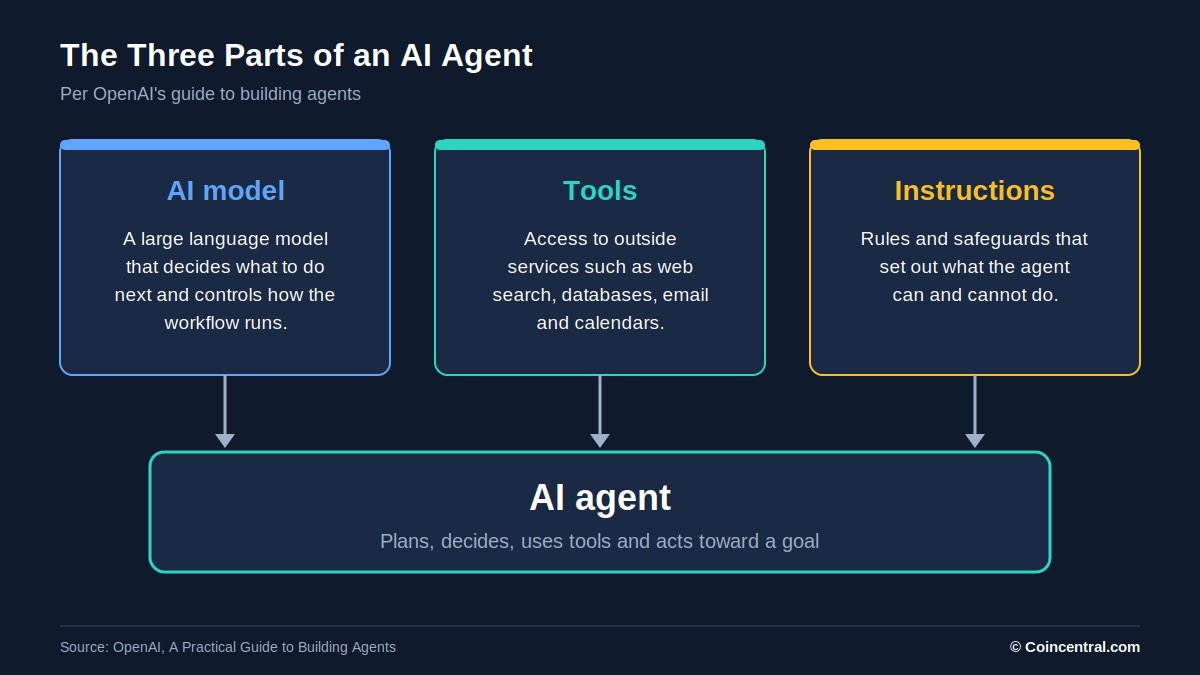 Figure 1: The three parts of an AI agent, based on OpenAI’s guide to building agents.
A Short Definition
An AI agent is an AI-powered system that can plan, make decisions, use tools and take several actions to reach a specific goal.
Some agents do simple jobs, such as sorting email or updating customer records. Others handle complex workflows that involve research, programming, data analysis and several software platforms.
The level of independence varies. Some agents ask for approval before every important step. Others complete long runs of low-risk tasks on their own.
Autonomous does not mean free of human control. Well-designed agents work within set permissions, security limits and approval rules.
How Do AI Agents Work?
Most modern agents are built around a large language model, or LLM. Models from OpenAI, Anthropic and Google give agents the reasoning to read instructions and decide what to do next.
The model is only one part. An agent also needs tools, access to information, instructions and a way to manage several actions.
Google Cloud describes this setup as a group of components: models, grounding, tools, memory, orchestration and a runtime environment. Together they let an agent move from writing text to working with real systems.
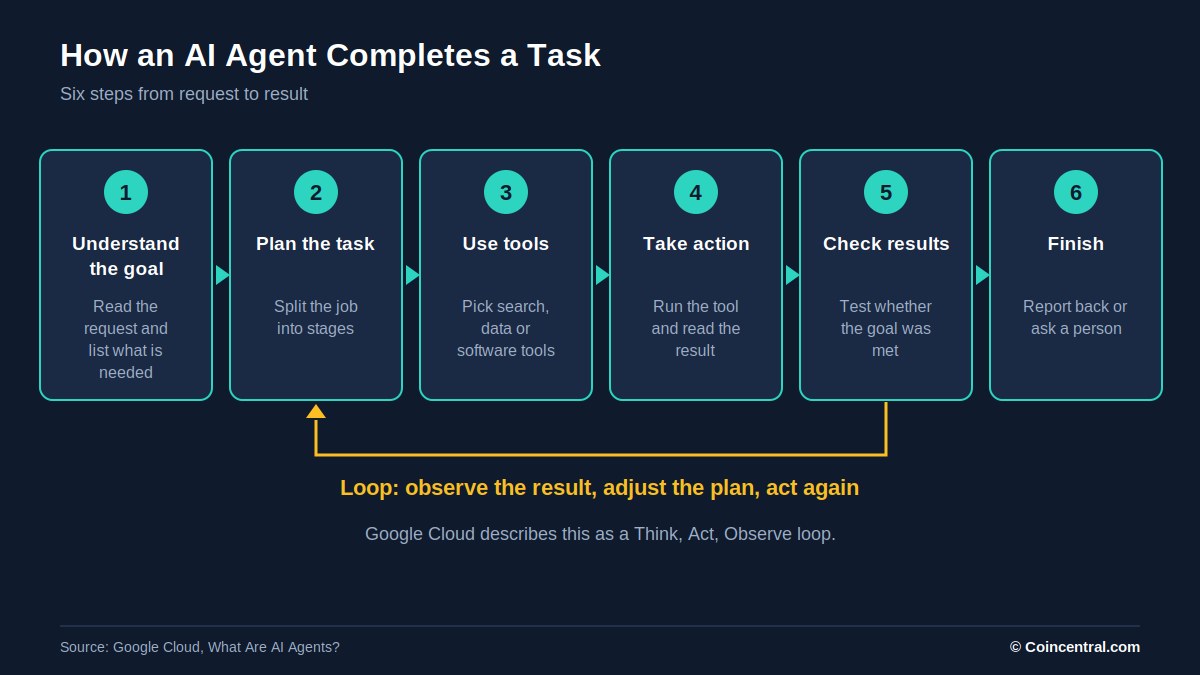 Figure 2: The six steps an AI agent follows, with a loop that repeats until the goal is met.
Step 1: Understand the Goal
A user gives the agent an objective. For example: “Find the five most affordable accounting software platforms for small businesses, compare their features and prepare a report.”
The agent works out what it needs. That could mean researching providers, checking prices, comparing features and creating a document. Unlike fixed software, it can change its approach based on what it finds.
Step 2: Plan the Task
Next the agent decides how to tackle the job. It might split the accounting project into stages: find providers, study products and prices, compare the results and write the report.
Plans can be wrong, though. Agents may miss a requirement or pick a slow route, so clear instructions and supervision matter.
Step 3: Use External Tools
Tools are what separate agents from ordinary chatbots. A language model alone cannot always reach outside software or private systems, so it needs access to specific tools.
A sales agent, for example, could use a customer relationship management (CRM) link to pull customer details and draft follow-up messages. A research agent might use web search to study competitors and a spreadsheet to organise the results.
Permissions set the limits. An agent with read-only email access can analyse messages but cannot send or delete them. This is central to building secure systems.
Step 4: Take Action
When the agent picks a tool, it requests an action. It might search a site, fetch a file, run code or update an approved record. The tool does the work and returns a result.
The model reads that result and decides whether more action is needed. This repeats as a cycle of planning, acting, observing and adjusting.
Google calls it a Think, Act, Observe loop. If a site returns an error, the agent may try another source instead of giving up.
Step 5: Check the Results
The agent has to judge whether it met the goal. That may mean running tests for code, checking the facts collected for research or confirming a customer’s problem is solved.
These checks are only as good as the system doing them. A model can wrongly decide a task is done.
Strong setups therefore use independent validation, limits on repeated actions and human approval for important decisions.
Step 6: Finish the Task
When the goal is met, the agent presents its results. It may also ask for more information or pass a problem to a person.
A travel agent, for instance, might prepare an itinerary but wait for approval before buying tickets. This mix of autonomy and oversight matters more as agents gain access to stronger tools.
AI Agents vs Chatbots: What Is the Difference?
People often use the two terms as if they mean the same thing. They describe different abilities. A chatbot mainly responds to messages, while an agent can use tools and decide how to finish a task with several actions.
Think of someone planning a holiday. A chatbot can suggest destinations, explain visa rules and recommend hotels. An agent could search flights, compare prices, check availability and build a proposed itinerary.
With the right integrations and permission, it might also start the booking.
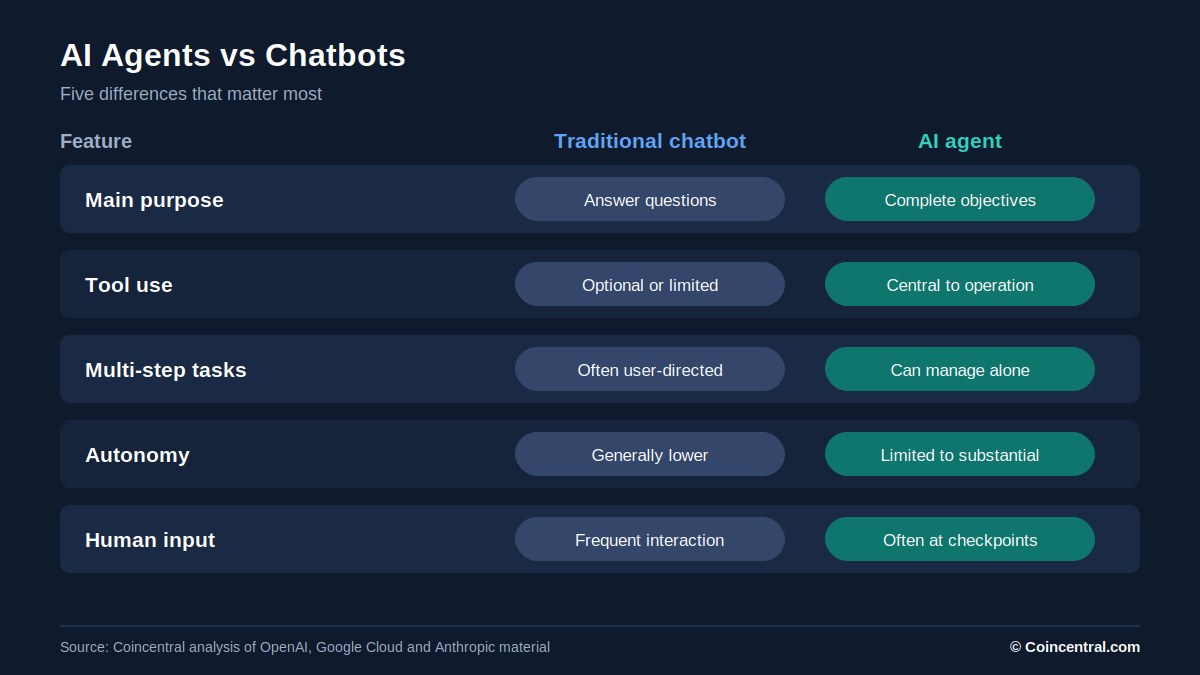 Figure 3: How a traditional chatbot and an AI agent differ across five features.
| Feature | Traditional AI chatbot | AI agent |
|---|---|---|
| Main purpose | Answer questions | Complete objectives |
| Decision-making | Mostly response-based | Selects actions and workflows |
| Tool usage | Optional or limited | Central to operation |
| Multi-step tasks | Often user-directed | Can manage independently |
| External applications | May have integrations | Uses tools to interact with systems |
| Autonomy | Generally lower | Varies from limited to substantial |
| Human supervision | Frequent interaction | Often at checkpoints |
| Example | Explaining how to book a flight | Searching and preparing a flight booking |
The line between the two is not fixed. Modern assistants increasingly include agent features. A product such as ChatGPT or Claude may act as a chat assistant or as an agent, depending on the tools and mode in use.
What matters is what the system can actually do, not how the product is marketed.
What Are the Different Types of AI Agents?
Agents can be grouped by ability, goal and level of independence. The groups overlap, but four common types have emerged.
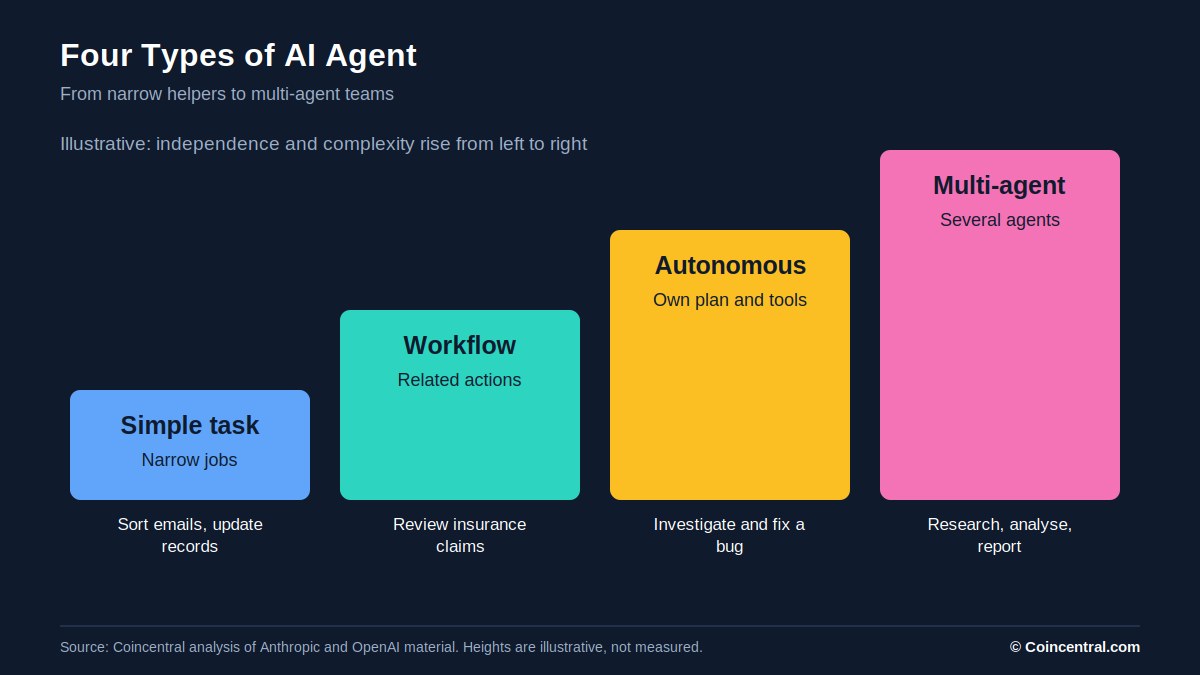 Figure 4: Four common types of AI agent. Bar heights are illustrative, not measured data.
Simple Task Agents
These handle narrow jobs, such as sorting customer emails, summarising documents or updating records. They use AI to read information but rely on a small set of tools.
The narrow scope makes them easier to supervise and test.
Workflow Agents
These coordinate several related actions. An insurance claims agent might review documents, spot missing information and prepare a recommendation for an employee.
Unlike traditional automation, it can read unstructured information and adapt to surprises.
Autonomous Agents
These have more freedom over how a task gets done. They can pick tools, plan several steps and change course based on results.
A software agent might investigate a bug, find the affected files, make changes and run tests. Without safeguards, a small mistake can carry into later actions.
Multi-Agent Systems
Some setups use several specialised agents. One researches, another analyses data and a third writes a report. A coordinating agent hands out tasks and combines the results.
Anthropic separates fixed AI workflows from systems where language models steer their own processes. Multi-agent designs add complexity and running costs.
More agents do not automatically give better results. For many tasks, one capable agent with the right tools is enough.
| Type | Typical job | What to know |
|---|---|---|
| Simple task | Sort emails, update records | Easy to supervise and test |
| Workflow | Review insurance claims | Handles unstructured information |
| Autonomous | Fix a software bug | Chooses its own tools and steps |
| Multi-agent | Research, analyse, report | Specialised roles, higher cost and complexity |
Real-World Examples of AI Agents
Agents are being built for many business and personal uses. The appeal is less manual effort on repetitive or complicated workflows.
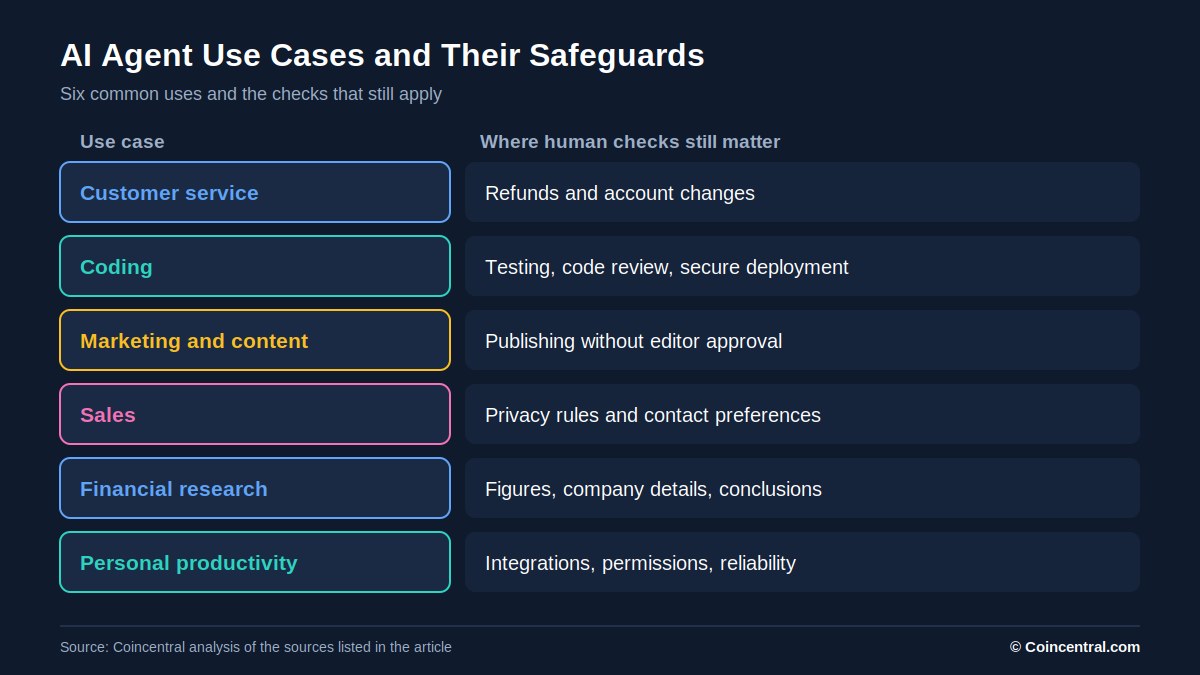 Figure 5: Six common AI agent use cases and where human checks still matter.
Customer Service
Support is one of the clearest uses. Older chatbots rely on set answers and struggle with unexpected questions. An agent can look into an issue using customer records and business systems.
If a customer asks why an order is late, the agent could pull tracking data, check delivery status and explain. It might prepare a replacement request or escalate the case. Refunds and account changes should still have controls.
Coding
Software development is one of the most visible uses. Coding agents can examine repositories, investigate errors and propose changes across several files. They can also run tests.
Tools such as Claude Code show how AI is moving beyond suggesting single lines of code. Still, AI code can add vulnerabilities, break existing features or misread requirements. Developers need testing, code review and secure deployment.
Marketing and Content
Teams can use agents to link tasks that once needed separate tools. An agent could research competitor sites, find topics and build an editorial calendar.
Businesses should be careful with automatic publishing. Wrong claims and low-quality material can hurt credibility, so human editorial approval remains useful.
Sales
Agents can help manage leads and messages. They can review enquiries, organise contacts and draft personalised follow-ups. With CRM access, they can also update records and flag opportunities.
Automated outreach must still follow privacy rules, marketing regulations and customer preferences.
Financial Research
Analysts spend a lot of time gathering data from reports and earnings announcements. An agent could fetch filings, extract figures and build a comparison.
That may cut the time needed for early research. Calculations, company details and conclusions should be checked independently before they influence investment decisions.
Personal Productivity
These agents aim to cut everyday admin, such as calendars, purchase research, travel plans and routine messages. One might review meeting times and propose a schedule.
How useful they are depends on integrations, permissions and the reliability of the underlying software.
AI Agents vs AI Automation
Agents are often called the next step in automation. Yet traditional automation still works very well for many processes.
Consider a company that sends an invoice when a customer completes a purchase. The rule is predictable, so there is rarely a need for an AI model to decide what happens next.
An agent adds value when information is unclear or unpredictable. Resolving a tricky complaint may mean reading several messages, reviewing account data and choosing how to proceed.
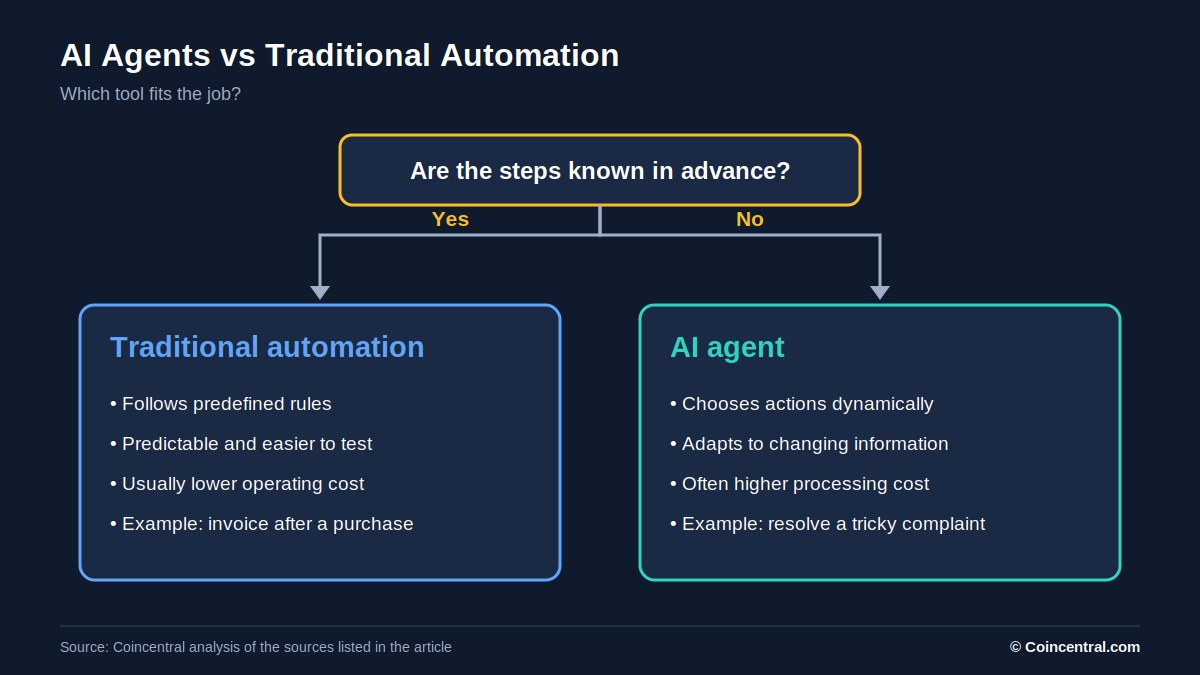 Figure 6: A simple test for choosing between traditional automation and an AI agent.
| Traditional automation | AI agents |
|---|---|
| Follows predefined rules | Can choose actions dynamically |
| Predictable execution | Adapts to changing information |
| Usually lower operating costs | Often higher processing costs |
| Easier to test | More difficult to validate |
| Ideal for repetitive processes | Useful for ambiguous workflows |
| Limited independent judgement | Uses model-based decision-making |
Businesses should not swap out working automation just because agents are fashionable. If a simple rule-based process is reliable, an agent may add cost and risk for no gain.
Benefits and Risks of AI Agents
The Benefits
The main benefit is productivity. An effective agent can run a series of tasks that would otherwise need repeated human input. That could cut admin work and free staff for higher-value jobs.
Flexibility is another gain. Traditional software needs developers to plan for every case, while agents can read unfamiliar requests and adapt. They can also connect existing systems and coordinate actions across compatible tools.
None of this is guaranteed. Success needs reliable integrations, supervision and careful measurement. An agent that makes frequent mistakes may save little time.
The Risks
Reliability is the most obvious risk. Models can misread instructions, produce wrong information or pick the wrong action.
When AI only gives an answer, the harm may be limited. When it can edit files, send messages or touch business systems, mistakes cost more.
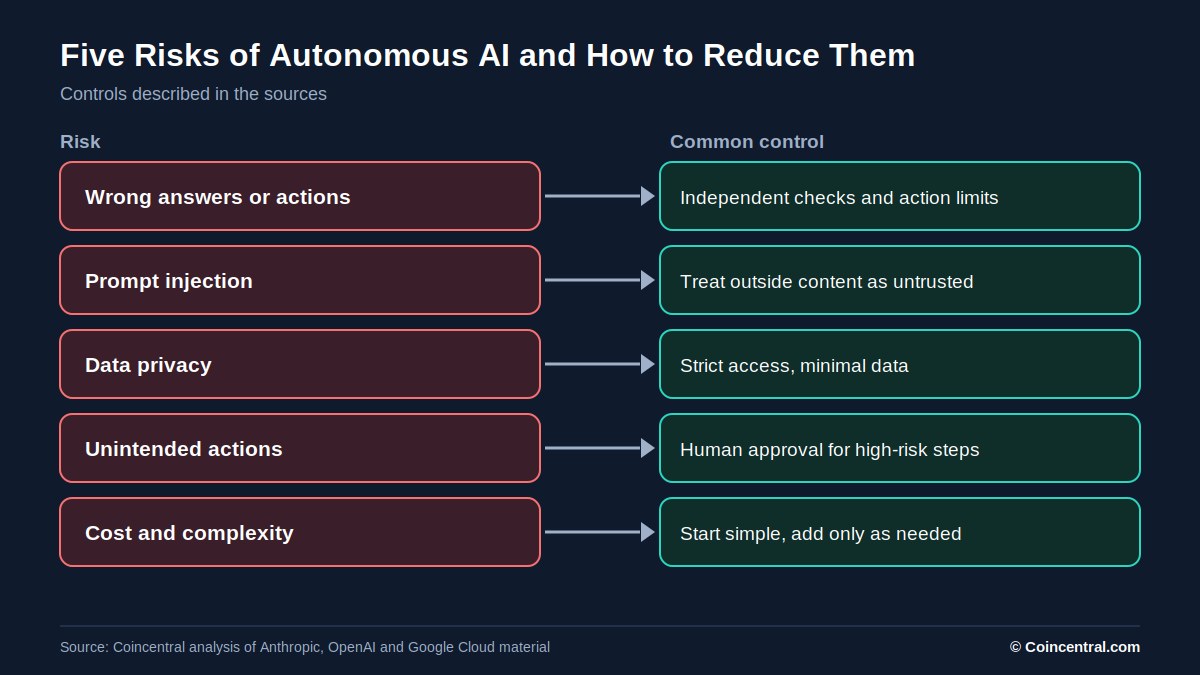 Figure 7: Five risks of autonomous AI paired with the controls the sources recommend.
Prompt Injection
This happens when harmful instructions are hidden in content an AI reads, such as a webpage, document or email. An attacker may try to make the agent ignore its original instructions or take an unauthorised action.
A malicious document might tell an agent to reveal confidential data. Secure systems must tell trusted instructions apart from untrusted outside content.
Data Privacy
Agents often need access to sensitive information such as emails, financial records, customer databases and internal documents. Poor permissions can expose data unnecessarily.
Businesses should use strict access controls and limit the data each agent can see.
Unexpected Actions
An agent may misread instructions and delete the wrong file or send the wrong email. The stakes rise when agents control payments or key business records.
High-risk actions should need explicit approval.
Cost and Complexity
Unlike a single chatbot reply, an agent may make dozens of model calls while it researches, plans and acts. Each call uses computing resources, so complex workflows raise costs and processing time.
Anthropic has said agents involve trade-offs between flexibility, performance, speed and expense. It advises starting with simpler solutions and adding complexity only when needed.
Autonomy, Building Agents, Jobs and the Future
Can AI Agents Run Fully on Their Own?
Technically, yes. Agents can be set up to run many actions without constant human input. Being able to do so is different from deploying them responsibly.
Full autonomy may suit low-risk tasks in controlled settings, such as organising non-sensitive files or analysing public information. Higher-risk work needs stronger oversight.
Payments, deleting important data, changing security settings and consequential customer decisions should generally need extra authorisation.
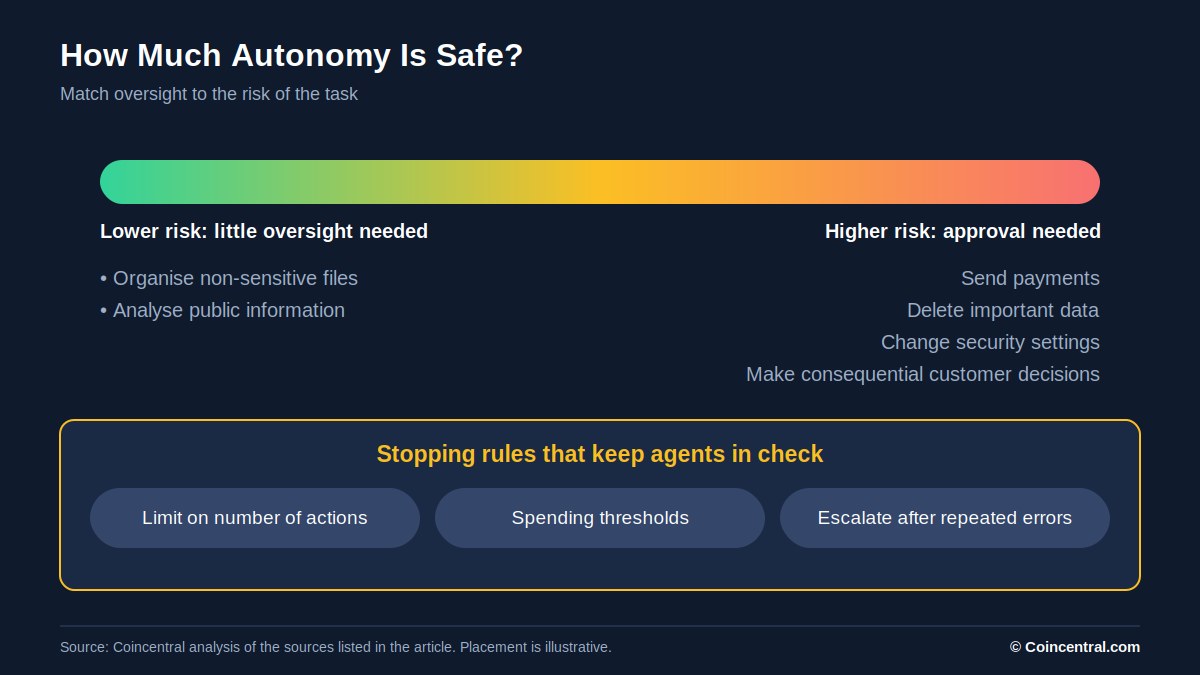 Figure 8: Oversight should rise with the risk of the task. Placement is illustrative.
A good system also has clear stopping rules. These can include limits on the number of actions, spending caps or automatic escalation after repeated errors.
Autonomy should be a setting, not a goal. The aim is reliable results, not removing people at every chance.
How Can You Build an AI Agent?
Building agents has become easier as companies release frameworks and tools. OpenAI offers an Agents SDK, and Google and Anthropic also provide resources.
A project usually starts with one specific task, such as retrieving new customer enquiries and drafting replies. The developer picks a model and writes instructions. The agent then gets approved tools, such as email, a customer database or a knowledge base.
Security limits and approval points come next. Finally, the system needs testing with ordinary tasks, unexpected inputs and cases where tools fail or return wrong data.
Coding skills are not always required. Visual automation platforms can link AI models with apps for simple workflows.
Advanced systems that touch financial data or live software need technical skill. Beginners should start with a small, low-risk task with measurable results.
Will AI Agents Replace Human Jobs?
Agents could automate parts of many jobs, especially repetitive digital work such as admin, customer support, data processing and some software development. But automating a task is not the same as replacing a job.
Most jobs mix technical work, judgement, communication and responsibility. Agents may help accountants process documents, yet complex financial decisions and regulatory duties still need professional oversight.
The long-term effect on employment is uncertain. Some firms may need fewer staff for certain tasks, while others may grow because AI makes costly work cheaper. New roles in AI supervision, integration and security may also appear.
What Is the Future of AI Agents?
Agents are likely to show up inside everyday software such as email, productivity tools, development environments and business platforms. We may also see more cooperation between specialised agents.
That adds challenges. Each part must pass on accurate information, respect permissions and avoid spreading errors.
Open questions remain about security and who is responsible for mistakes. The strongest systems may pair useful automation with firm controls and easy human intervention.
Frequently Asked Questions
What is an example of an AI agent?
A customer support agent is a common one. It can receive an enquiry, retrieve customer information and investigate an order without an employee doing every step.
Do AI agents need human supervision?
Not every action needs approval. Supervision matters for sensitive data, financial transactions and changes that cannot be undone.
What is the difference between agentic AI and generative AI?
Generative AI creates content such as text, images and code. Agentic AI uses AI models to choose actions and pursue goals through tools and workflows. Many agents use generative models as their reasoning engine.
Final Thoughts
AI agents extend what chatbots started. They combine language models with tools, memory, planning and feedback to complete tasks that once needed constant human input.
The best measure of progress is not how independently an agent can act. It is whether it finishes useful tasks accurately, securely and at a fair cost.