AI video tools can now turn a written prompt into a short film clip, animate a photo or create a talking presenter. Prices and free allowances differ a lot from one tool to the next. This article looks at the numbers behind ten popular generators.
The figures come from a Computing.net comparison updated on 3 November 2026. Prices are approximate US list prices. Annual billing discounts, credit allowances and regional pricing can change what a person actually pays.
Some tools do not publish a fixed price in the source material. They appear in some tables but not in the price charts.
Where the source gives a range or says a price is approximate, this article keeps that wording. Totals, averages and percentages are simple calculations made from those figures. They show patterns and do not replace the current price on each provider’s website.
The Ten Tools at a Glance
The ranking covers ten platforms. Google Flow is first, followed by Runway, Kling AI, Luma AI and Pika. Hailuo AI, HeyGen, Synthesia, Adobe Firefly and Higgsfield AI complete the list.
The ranking is an editorial assessment. It looks at output quality, controls, practical use, cost and access. It is based on documented features and published comparisons, not on original hands-on tests of all ten platforms.
Rank | Tool | Developer | Best for |
|---|---|---|---|
1 | Google Flow | Realistic video with audio | |
2 | Runway | Runway | Professional video production |
3 | Kling AI | Kuaishou | Realistic motion and value |
4 | Luma AI | Luma AI | Cinematic video and editing |
5 | Pika | Pika | Social media and creative effects |
6 | Hailuo AI | MiniMax | Affordable short videos |
7 | HeyGen | HeyGen | AI avatars and marketing videos |
8 | Synthesia | Synthesia | Training and corporate videos |
9 | Adobe Firefly | Adobe | Commercial creative workflows |
10 | Higgsfield AI | Higgsfield | Cinematic advertising and effects |
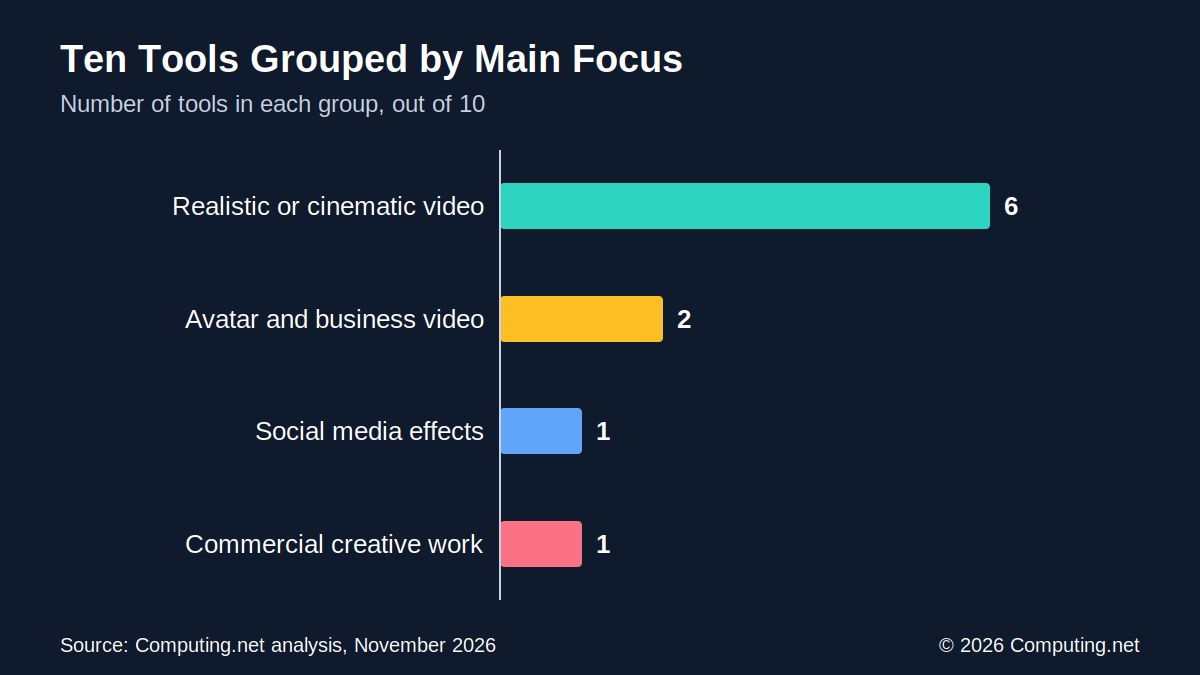
Six of the ten tools focus on realistic or cinematic video. Pika aims at short social clips, and Adobe Firefly aims at commercial creative work.
HeyGen and Synthesia are different. They make videos with AI presenters rather than fictional scenes.
The developers come from several parts of the industry. Google and Adobe are large technology companies, and Kuaishou, a Chinese technology company, builds Kling AI. MiniMax builds Hailuo AI, while Runway, Luma AI, Pika, HeyGen, Synthesia and Higgsfield are specialist providers.
The list also splits by use case. Someone making a social clip, a training video and an advert would likely pick different tools from it. Price is one factor, but it is not the only one.
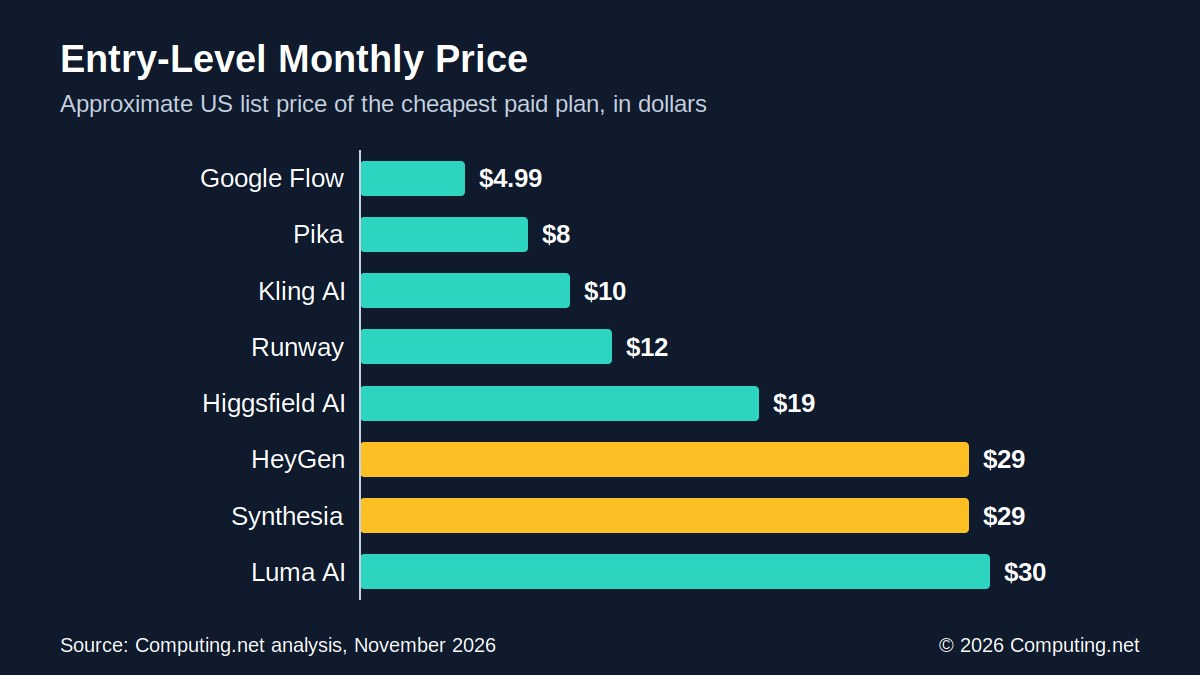
Entry-Level Prices: From $4.99 to About $30 a Month
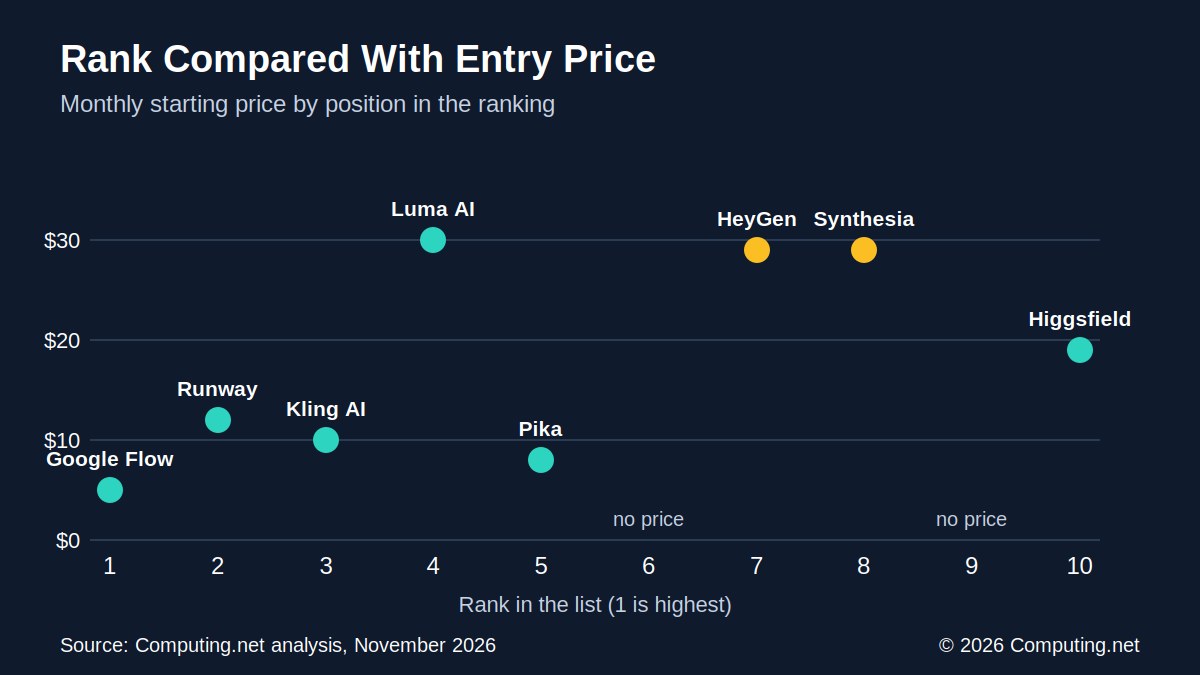
Eight of the ten tools have a published starting price. Google Flow is the lowest at $4.99 per month through Google AI Plus. Luma AI is the highest at about $30 per month.
That gap is about six times. The average starting price across the eight tools is $17.75, and the middle value is $15.50.
Tool | Entry paid price | Billing note |
|---|---|---|
Google Flow | $4.99 per month | Google AI Plus |
Pika | About $8 per month | Billed annually |
Kling AI | About $10 per month | Approximate, generally available |
Runway | About $12 per month | Standard plan, billed annually |
Higgsfield AI | About $19 per month | Pricing changed during 2026 |
HeyGen | $29 per month | Creator plan |
Synthesia | About $29 per month | Starter plan, annual options |
Luma AI | About $30 per month | Main creative plans |
Hailuo AI | Varies | Depends on model and promotion |
Adobe Firefly | Credit-based | Depends on plan and model |
Hailuo AI and Adobe Firefly do not list a single starting price. Hailuo pricing changes with the model and any promotion. Adobe Firefly uses credit-based plans.
Some prices assume annual billing. Runway’s $12 and Pika’s $8 apply when billed yearly, so paying month to month may cost more.
Google’s entry plan is sold as Google AI Plus, so the price is tied to a Google subscription rather than a standalone video plan. Kling AI’s figure of about $10 is described as a price that has generally been available, which means it can change.
All prices in the source are list prices in US dollars. Regional pricing varies, so users outside the US may see different amounts. Promotional offers can also change the first month’s cost.
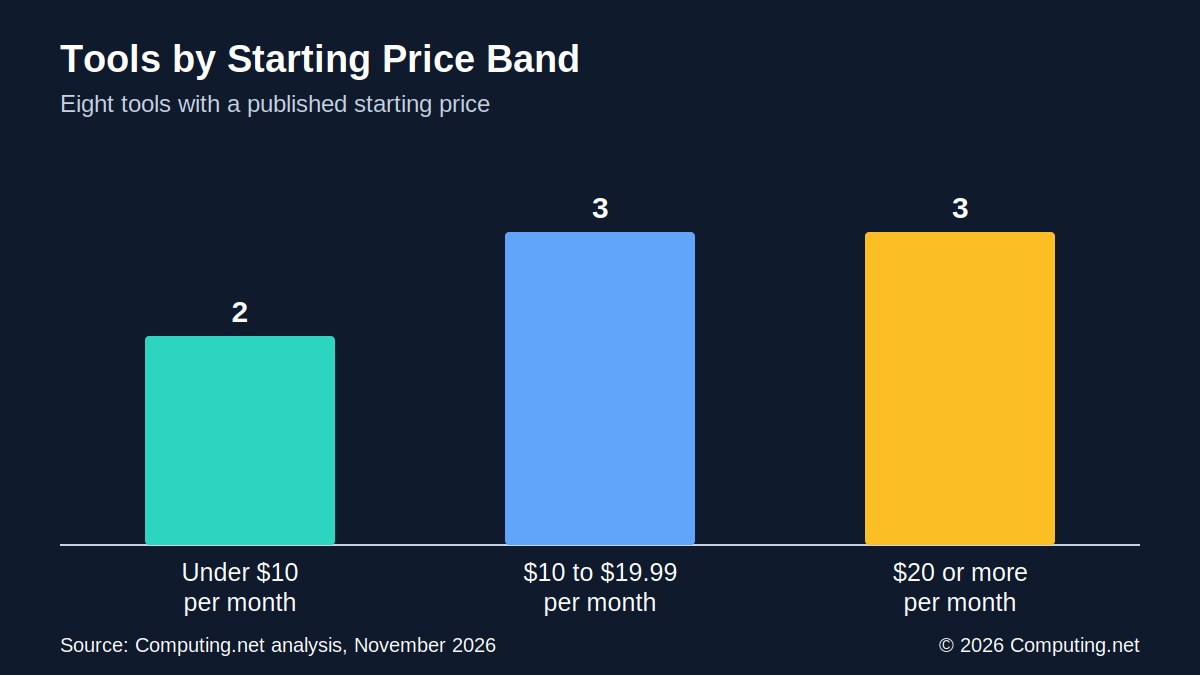
Price Bands: Where Most Tools Sit
Grouping the eight priced tools shows a clear pattern. Two tools start under $10 per month. Three start between $10 and $19.99, and three start at $20 or more.
Price band | Tools in band | Which tools |
|---|---|---|
Under $10 | 2 | Google Flow, Pika |
$10 to $19.99 | 3 | Kling AI, Runway, Higgsfield AI |
$20 or more | 3 | HeyGen, Synthesia, Luma AI |
The cheapest band holds Google Flow and Pika. The middle band holds Kling AI, Runway and Higgsfield AI. The top band holds Luma AI, HeyGen and Synthesia.
HeyGen and Synthesia are both near $29, while Luma AI is near $30. The two avatar tools therefore sit with one scene tool at the top of the range.
A low starting price does not show the full cost. Many plans use credits, and each video can use a different number of credits. Later sections cover this in more detail.
Grouping by price helps buyers narrow a shortlist. A person with a budget under $10 has two options in this list. A person willing to pay $20 or more has three, but two of them make avatar videos rather than scenes.
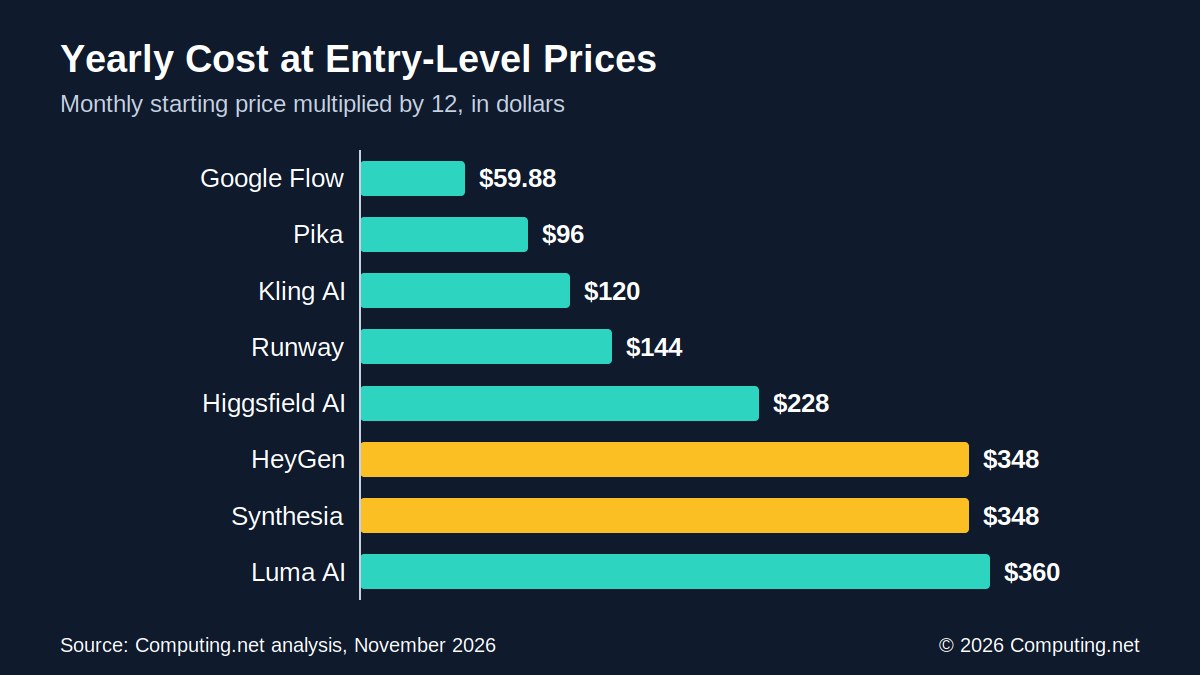
What a Year Costs at Entry Level
Monthly prices look small, but yearly totals show the gap more clearly. Multiplying each starting price by 12 gives a rough annual cost.
Tool | Monthly price | Twelve months |
|---|---|---|
Google Flow | $4.99 | $59.88 |
Pika | $8 | $96 |
Kling AI | $10 | $120 |
Runway | $12 | $144 |
Higgsfield AI | $19 | $228 |
HeyGen | $29 | $348 |
Synthesia | $29 | $348 |
Luma AI | $30 | $360 |
Google AI Plus comes to $59.88 a year. Luma AI comes to $360. The difference is $300.12.
HeyGen and Synthesia each come to $348 a year at their $29 starting plans. Runway comes to $144 and Kling AI to $120.
These are simple calculations, not quotes. Annual billing discounts and plan changes can lower or raise the real figure.
Higgsfield AI comes to $228 a year. The source notes that its pricing and credit allowances changed during 2026, so buyers should check current plans first.
A yearly view also helps users who only need a tool for a short project. A one-month plan at $12 or $30 costs much less than a full year. The yearly totals matter most for teams that expect to make videos all year.
Annual billing changes the picture for some tools. Runway and Pika quote their prices on annual billing, so their yearly totals are closest to what a yearly subscriber would see. For the others, the monthly price may differ from the one used here.
Free Access: Who Offers What
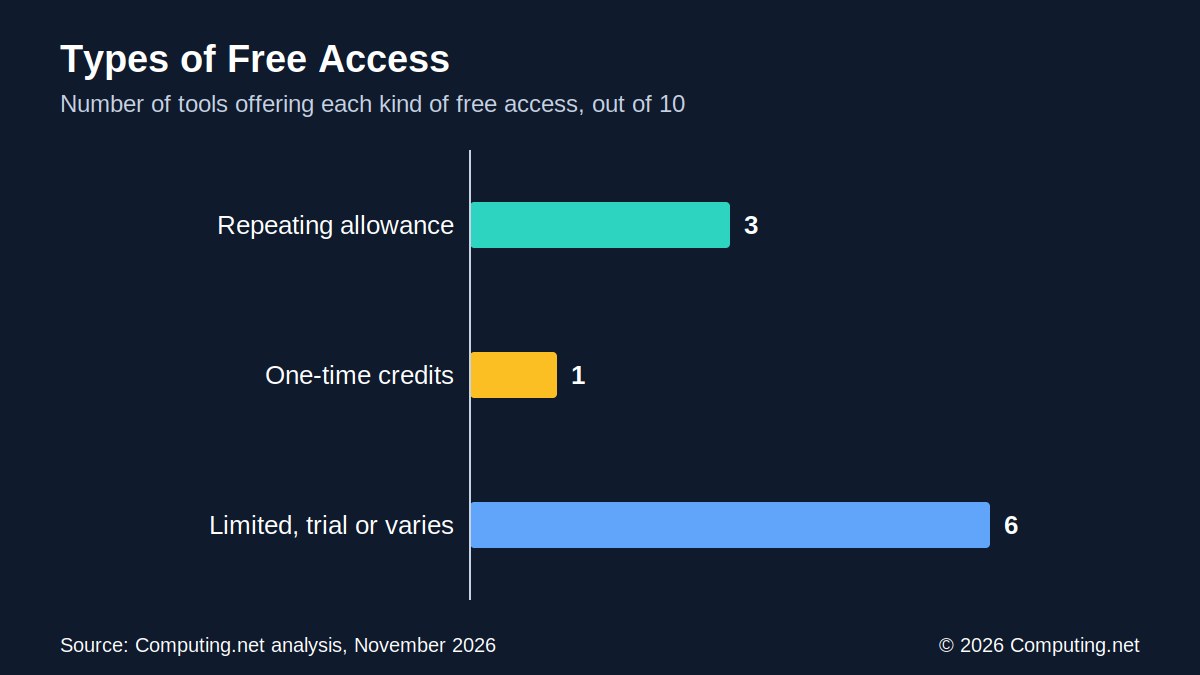
Free access takes several forms. Some tools give a daily allowance, one gives a one-time pot of credits, and many offer limited or trial access.
Tool | Free access | Type |
|---|---|---|
Google Flow | 50 daily credits | Repeating |
Runway | 125 credits, allocated once, no renewal | One-time |
Kling AI | Limited access, allowances change | Limited |
Luma AI | Limited or trial, varies by account | Limited |
Pika | Limited, credit-based | Limited |
Hailuo AI | Limited free generations | Limited |
HeyGen | 3 videos a month, up to 1 minute each, watermark | Repeating |
Synthesia | Free Basic plan with monthly allowance | Repeating |
Adobe Firefly | Limited trial access | Limited |
Higgsfield AI | Limited promotional access | Limited |
Three tools offer a free allowance that repeats: Google Flow, HeyGen and Synthesia. Runway offers a one-time allowance. The other six offer limited, trial or promotional access that can change.
Free plans come with limits. Many platforms restrict resolution, video length, commercial use and monthly allowances. HeyGen’s free videos also carry a watermark.
Runway’s free credits do not expire, but they do not renew either. Once they are spent, the free plan is empty. The source describes this as a way to explore the platform, not a lasting plan for frequent video making.
Synthesia’s free plan changed in October 2026. The source says it now includes a monthly allowance for exploring video creation and other AI features, but it does not give a number.
Google Flow Credits: Free, Plus and Pro
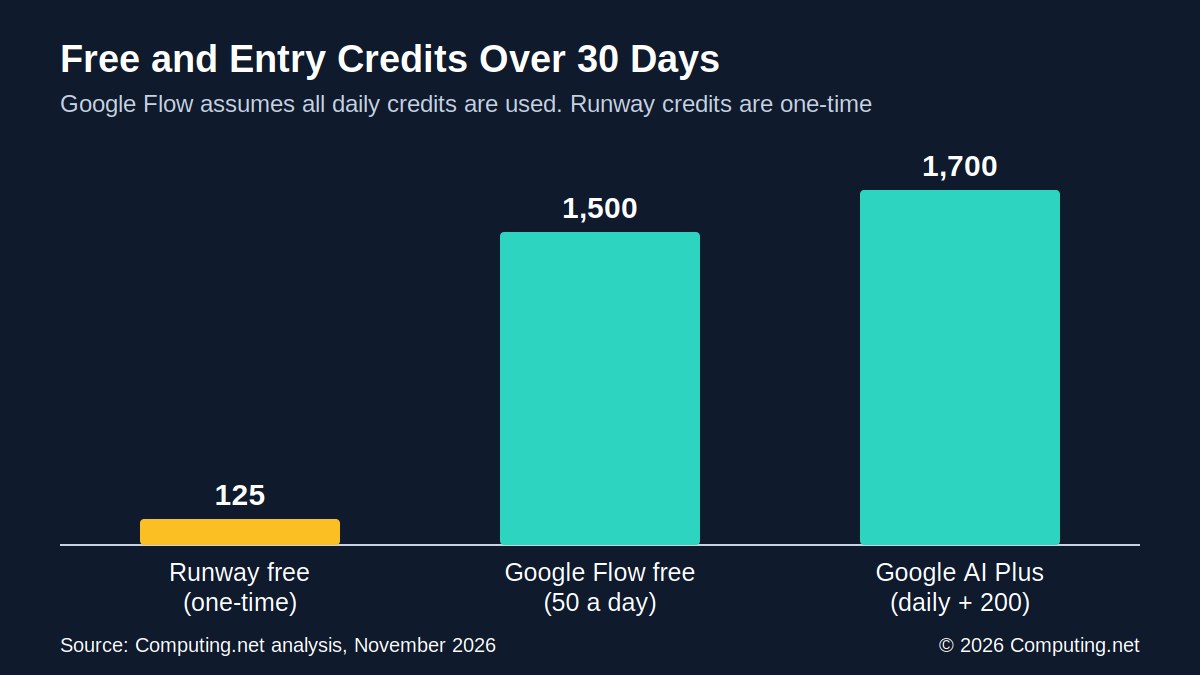
Google Flow publishes the most detailed free figures in the group. The free plan gives 50 credits per day. Over 30 days, that adds up to 1,500 credits.
Google AI Plus costs $4.99 per month and adds 200 monthly credits on top of the daily allowance. If a user spends every daily credit, that gives about 1,700 credits over 30 days.
Plan | Price | Credits |
|---|---|---|
Google Flow free | $0 | 50 per day, about 1,500 over 30 days |
Google AI Plus | $4.99 per month | 200 monthly plus the daily allowance, about 1,700 over 30 days |
Google AI Pro | $19.99 per month | More monthly credits, exact number not stated in the source |
Runway free | $0 | 125 credits, allocated once |
Runway’s free plan gives 125 credits once. That is about 8 percent of what Google’s free plan offers over 30 days. Credits are not the same across tools, so this is a rough comparison only.
The number of credits needed for one video depends on the model, resolution and length. Users should check the credit cost of a generation before paying.
Google AI Pro costs $19.99 per month. It gives extra monthly credits and other AI subscription benefits, but the source does not give the credit count. That makes a direct comparison with the cheaper plans hard.
Daily credits behave differently from monthly credits. The source does not say whether unused daily credits carry over, so the 1,500 figure is the most a user could spend in 30 days.
Cost per Usable Clip
Advertised prices count the subscription, not the result. AI video tools do not always follow instructions, so some clips cannot be used. The cost that matters is the cost of each finished clip.
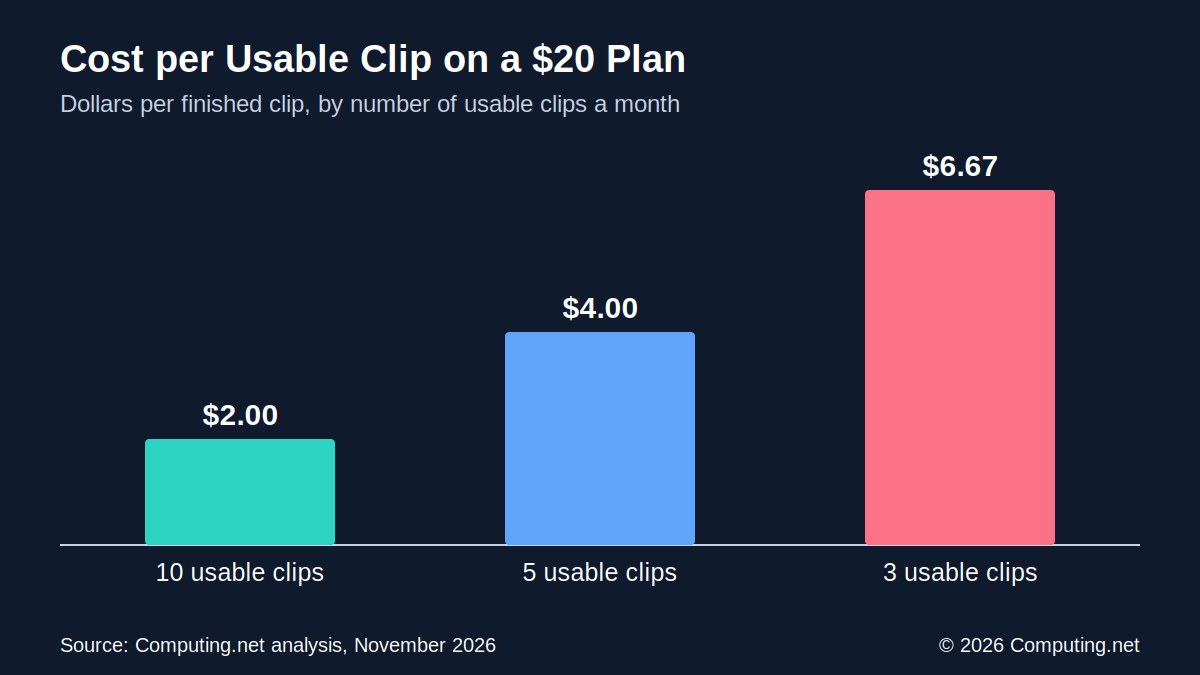
Take a $20 monthly plan. If it produces ten usable clips, each one costs $2. If it produces five, each costs $4, and if only three meet the standard, each costs about $6.67.
Usable clips a month | Cost per clip | Compared with 10 clips |
|---|---|---|
10 | $2.00 | Baseline |
5 | $4.00 | 2 times higher |
3 | $6.67 | About 3.3 times higher |
The same plan costs more than three times as much per clip when the number of usable clips falls from ten to three. Complex scenes, human movement and consistent characters are common reasons for repeat attempts.
The source names failed generations as the biggest hidden cost. Audio can also use more credits, and a long high-resolution video costs more than a five-second clip.
The $20 example is close to the price of Google AI Pro at $19.99. It is not a claim about any one tool’s success rate. It shows how the cost changes as the share of usable clips changes.
Credit-based pricing makes this easy to miss. A cheap plan with expensive models can run out in days. A plan that uses few credits per clip can stretch much further.
Scene Generators and Avatar Tools
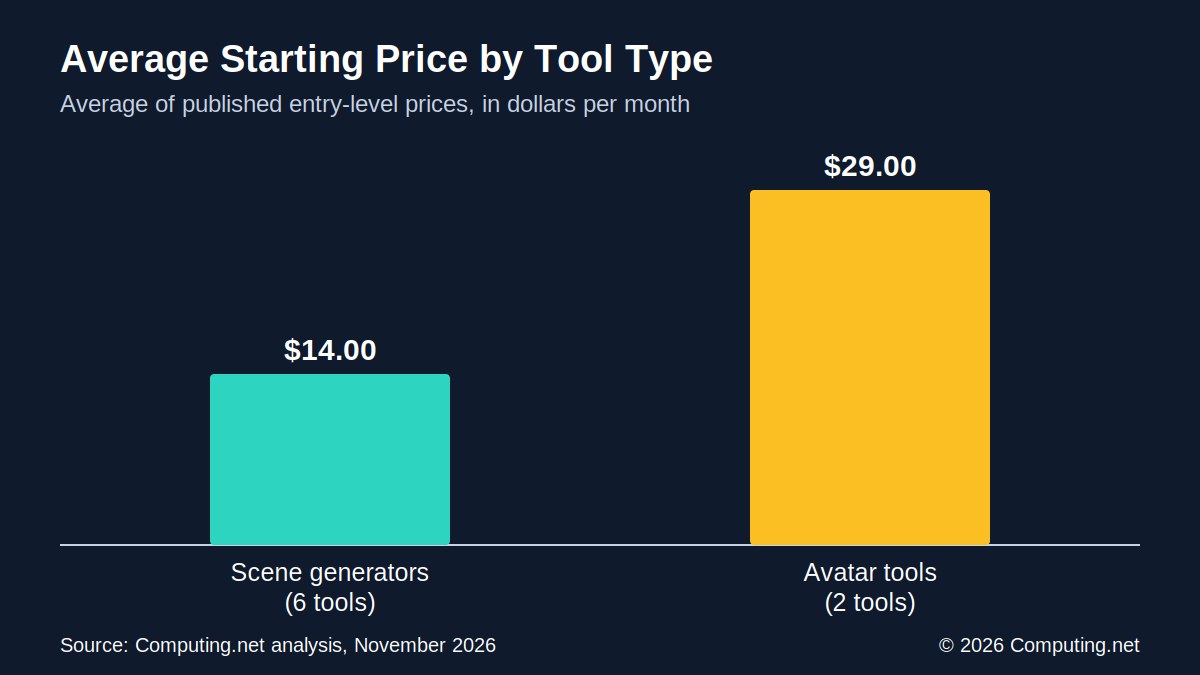
Six of the priced tools generate scenes: Google Flow, Runway, Kling AI, Luma AI, Pika and Higgsfield AI. Their average starting price is $14.00 per month.
The two avatar tools, HeyGen and Synthesia, both start at about $29. That is roughly twice the scene average.
Tool type | Priced tools | Average starting price |
|---|---|---|
Scene generators | 6 | $14.00 |
Avatar tools | 2 | $29.00 |
Avatar tools do a different job. A user picks a virtual presenter, adds a script and gets a finished video. Traditional filming needs cameras, lighting, microphones and editing, and avatars can remove some of those steps.
HeyGen’s free plan allows three videos a month, each up to one minute. That is at most three minutes of video. Its $29 Creator plan adds higher allowances and removes the watermark.
Synthesia offers a free Basic plan, which changed in October 2026 to include a monthly allowance. Its Starter plan is advertised at about $29, with annual billing options.
The gap does not mean one type is better value. A scene generator and an avatar tool solve different problems. The comparison only shows what each group charges to get started.
Both avatar tools support more than one language, according to the source. HeyGen offers translation and multilingual content, and Synthesia supports numerous languages with tools for structured training content.
Sora: A Tool That Left the Market
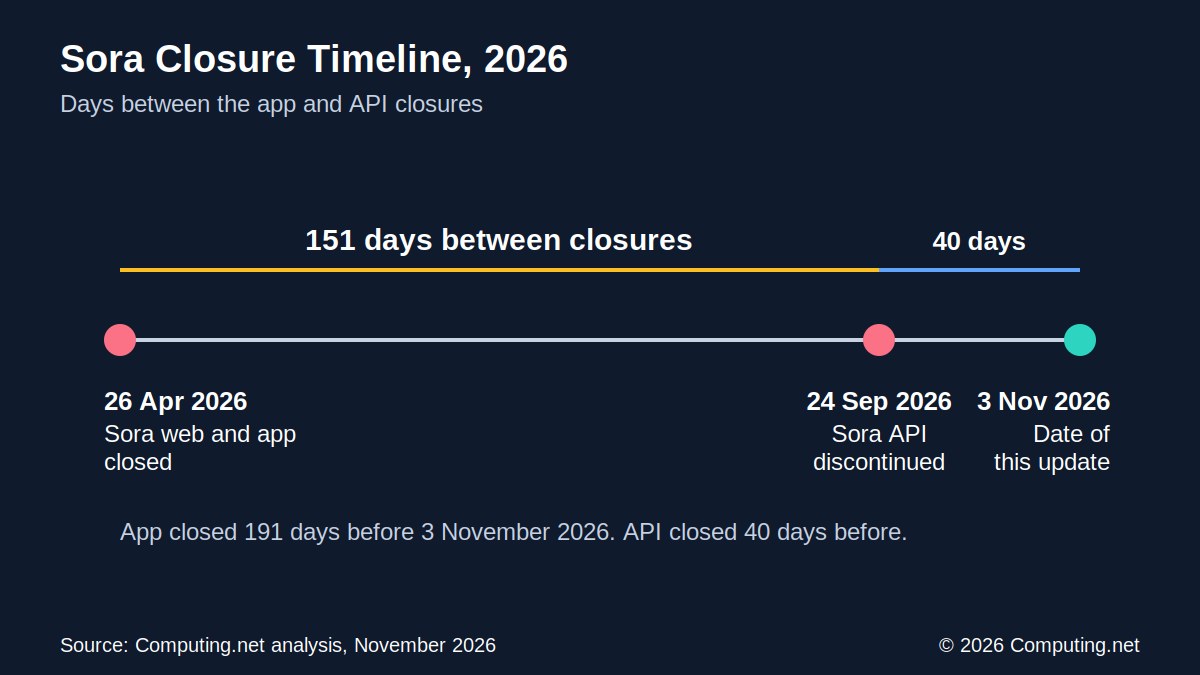
OpenAI’s Sora is missing from the ranking because it is no longer available. OpenAI discontinued the Sora web and app experiences on 26 April 2026.
The Sora API followed on 24 September 2026. That was 151 days after the app closed.
Date | Event | Days after app closure |
|---|---|---|
26 April 2026 | Sora web and app discontinued | 0 |
24 September 2026 | Sora API discontinued | 151 |
3 November 2026 | Date of this update | 191 |
As of 3 November 2026, the app has been closed for 191 days and the API for 40 days.
The closure shows how fast this market moves. Products can be replaced, restructured or discontinued within months. Prices also change: Higgsfield AI changed its plans during 2026, and Synthesia changed its free plan in October.
For businesses, this is a reason to avoid depending on a single provider.
Sora was one of the most recognized AI video products after its first announcement. Its absence from the ranking is a reminder that a ranking only reflects what is on sale at a given time. Readers should check that any tool they pick is still supported.
Other details in the source point the same way. Adobe Firefly offers third-party models alongside its own, and these can carry different terms. Businesses should read the licence for each model before commercial use.
What the Numbers Show
Rank and price do not move together. The top-ranked tool has the lowest starting price at $4.99. The fourth-ranked tool has the highest at about $30.
Runway ranks second at $12, Kling AI third at $10 and Pika fifth at $8. HeyGen and Synthesia rank seventh and eighth at $29 each, and Higgsfield AI ranks tenth at about $19.
Measure | Figure |
|---|---|
Lowest entry price | $4.99 (Google Flow) |
Highest entry price | About $30 (Luma AI) |
Average entry price, eight tools | $17.75 |
Middle entry price, eight tools | $15.50 |
Tools with a repeating free allowance | 3 of 10 |
Runway one-time free credits | 125 |
Google Flow free credits | 50 per day |
Cost per usable clip, $20 plan example | $2.00 to $6.67 |
Three points come out of the data. The starting price is only the first number to check. Free access ranges from a daily allowance to a one-time pot, and the cost of a usable clip can be several times the headline price.
All figures come from list prices and published allowances in the source material. Credits, model costs and plans change often, so readers should confirm current terms before buying.
No tool wins on every number. Google Flow is lowest on starting price and has the most detailed free allowance. Runway costs less per year than HeyGen, Synthesia and Luma AI, but its free credits are one-time.
The most useful number for a buyer is the cost of a finished clip. A free plan is a good way to test that number before paying. A tool that gives a few usable clips for free may save money later.