


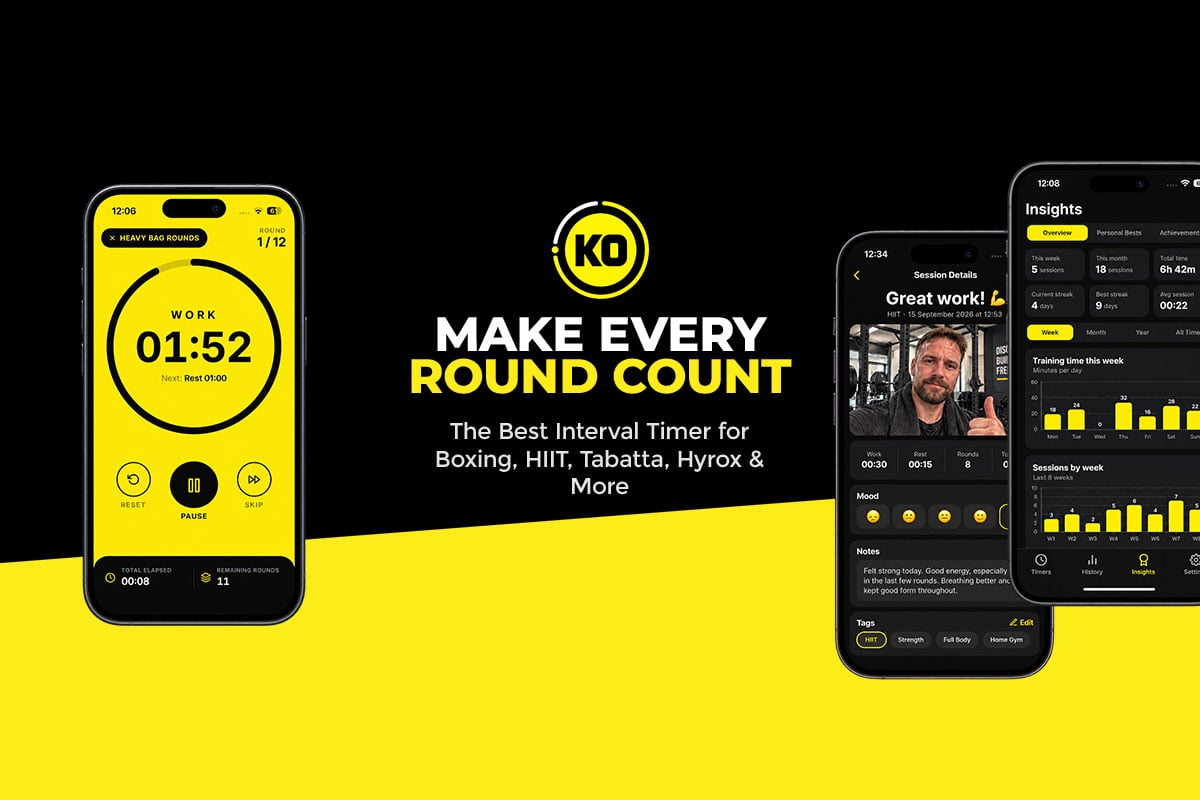
A workout doesn’t start when the first bell rings or end when the last one fades. There’s the setup beforehand, the grind in the middle and the reflection afterwards. Most interval timers only care about the middle part.
KO Interval Timer is different. This iPhone app for boxing, HIIT, circuits and more is designed to help at every stage of your training. To show what that means in practice, we’ve organized this review around a single session, from the moment you pick up your phone to long after you’ve hung up your gloves.
Before the Bell: Setting Up Your Session
Everything begins with the custom workout builder, and it’s impressively flexible. You set your work periods, rest times, number of rounds and preparation countdown, then give each phase a custom name. A boxer might build five three-minute rounds with one-minute breaks. A HIIT enthusiast might go with 30 seconds of work and 15 seconds of rest. Quick home sessions and longer gym workouts are equally easy to set up.
Once a timer is built, save it to your personal library and it’s ready next time with no re-entering settings. Want a tougher variation? Duplicate an existing timer and adjust it to add rounds or cut rest.
Getting started is fast. Home screen widgets put saved timers within one tap and can show training summaries. Siri Shortcuts can launch a workout by voice, which is handy when your hands are already wrapped. Before you begin, you can also personalize the app’s accent color, timer sounds and coaching voice so it feels like your own.

During the Rounds: Staying on Track and Motivated
Once the clock is running, KO Interval Timer makes it easy to stay focused. The countdown is large and clear, so a glance tells you exactly how long is left. Customizable alerts mark the start of the session, every switch between phases and the end of the workout, and spoken countdowns mean you can keep your eyes on your target. Optional vibration and visual signals help too, whether you’re in a busy gym or training at home. Turn on keep-screen-awake and the timer stays visible without unlocking your phone.
A Voice in Your Corner
This is where the app really comes alive. Optional voice coaching replaces plain beeps with encouragement just when you need it, choosing from three coaches. The Male Coach keeps you focused and pushing, and the Female Coach offers another voice of guidance and encouragement. The Boxing Coach brings fight-gym energy that pairs brilliantly with heavy bag rounds, shadowboxing and combat sports.
The Boxing Coach’s optional Funny Mode adds humorous motivational comments between rounds. Hearing a joke right after an exhausting round, followed by the call to get ready, adds real personality to a category of apps that’s usually all business. And if you’d prefer to train with simple sounds and countdowns, coaching switches off easily.

After the Final Bell: Capturing the Session
When other timers go quiet, KO Interval Timer is just getting to its best feature: the built-in workout journal. Right after training, you can save an entry with written notes, tags, a difficulty rating and how you felt before and after. Bodyweight can be logged too, if you want to follow it over time.
Then comes the fun part: a post-workout selfie, saved straight into the entry. It may seem like a small extra, but it transforms your history. Instead of rows of dates and numbers, you’ll have photos of yourself after every session, red-faced, sweaty and proud. For anyone working toward weight loss, muscle gain or better fitness, that visual record can be hugely motivating.
Notes, data and photos together make the journal feel like a real fitness diary rather than a training log.
Weeks Later: Watching Your Progress Add Up
The real value of all those entries shows up over time. Flip back through your journal and patterns emerge. A workout that wrecked you a month ago may now feel easy, or certain sessions may consistently leave you more energized.
The app’s stats fill in the rest of the picture. It keeps a history of your completed workouts, showing total training time, rounds completed and workout activity, plus training streaks that reward you for showing up. You’ll see at a glance how often you train, whether your round count is climbing and how your routine is changing.
Achievement badges add a game-like layer on top, celebrating your milestones and giving you goals to chase. If you love completing challenges, each new badge is a satisfying reason to lace up again.

Not Just for Fighters
KO Interval Timer wears its boxing roots proudly, yet its flexible builder makes it useful for nearly any interval-based routine:
- Boxing and kickboxing: heavy bag work, shadowboxing, pad sessions and sparring rounds.
- HIIT and Tabata: high-intensity bursts with short, sharp recoveries.
- Circuit training: timed work and rest as you rotate through exercises.
- Strength and conditioning: timed sets, rest periods and conditioning rounds.
- Stretching and mobility: longer intervals for flexibility and recovery.
Personal trainers can also build repeatable sessions for clients and switch between training styles with ease.
Privacy, Pricing and the Fine Print
Your journal, notes and photos stay on your iPhone rather than on the developer’s servers, and you don’t need an account to use the app. That’s reassuring if you’d prefer to keep selfies and bodyweight data private. The flip side is that there’s currently no cloud backup or syncing, so don’t assume your journal will be restored if you switch phones or delete the app.
KO Interval Timer is free to download from the App Store and requires iOS 16.4 or later. The timer and other premium features need an active subscription, with monthly and annual plans priced up front. It’s also designed to run with the app open and doesn’t yet offer background or lock-screen alerts, which is easy to manage with your phone in view. Full details are on the KO App Studio site.
Final Round: Our Verdict
Follow KO Interval Timer through a full session and its appeal becomes clear. Before you train, the builder, library, widgets and Siri Shortcuts get you moving fast. During the rounds, clear alerts and three motivating voice coaches keep you on task, with Funny Mode supplying the laughs. Afterwards, the journal, selfies, stats, streaks and badges turn each workout into part of a bigger story.
The subscription and lack of background alerts are worth keeping in mind, but they don’t take away from a thoughtfully designed, genuinely motivating app. For boxers, HIIT fans and anyone who wants to see how far they’ve come, KO Interval Timer earns a strong recommendation.
Ready for round one? Download KO Interval Timer on the App Store or explore the app on KO App Studio.
